Internet slow at night? Why evenings lag and how to fix it (2026 guide)
The Net Fix · Updated · 19 min read
The short answer
Internet is slow at night because evenings, roughly 7 to 11 pm, are peak hours: your home streams, games and video-calls at once, and so does everyone sharing your provider's cable node, cell tower or satellite beam. To find which one it is, run one test at 9 pm on a cable with everything else paused. Fast and steady means your home is the bottleneck, which Smart Queue and scheduled downloads fix. Still slow means the line is congested: log it hour by hour with the 24/7 monitor and send the report to your provider.
Internet slow at night? Try this tonight (10 minutes)
If your internet is fine in the morning and crawls every evening, you are not imagining it, and you're not alone: it is the most common speed complaint there is. The good news is that a large share of evening slowdowns start inside the home and can be fixed tonight. Start here:
- At the time it's usually slow, plug a laptop into the router with an Ethernet cable, pause every other device (streams, consoles, phones uploading photos) and run the speed and lag test. Write down download, upload and lag under load.
- Run the same test in the morning, in the same way. If the evening result is much worse even with your home quiet, the slowdown is on the line. If both are fine, your home is the bottleneck at night.
- Look at lag under load. If it jumps by more than 30 ms while the test runs, your connection's queue fills up (bufferbloat) when the house is busy. Turn on Smart Queue with the Smart Queue assistant.
- Move big downloads out of the evening: set consoles, PCs and phones to update overnight, and see how to stop background downloads.
- Put the console or gaming PC on a cable, and move phones and laptops to the 5 GHz or 6 GHz Wi-Fi network instead of 2.4 GHz.
- Run Test & Optimize in the evening. It checks speed, lag, packet loss, Wi-Fi, DNS and more in about two minutes and says whether the weak spot is in your home, on your line or beyond.
Why is my internet slow at night?
Every home connection shares something. A cable line shares capacity with the other homes on your neighborhood node. 5G home internet shares the cell tower with every phone nearby. Starlink shares the satellite beam over your area. Fiber shares a splitter too, though with far more room. And inside your home, every device shares one connection and one Wi-Fi network.
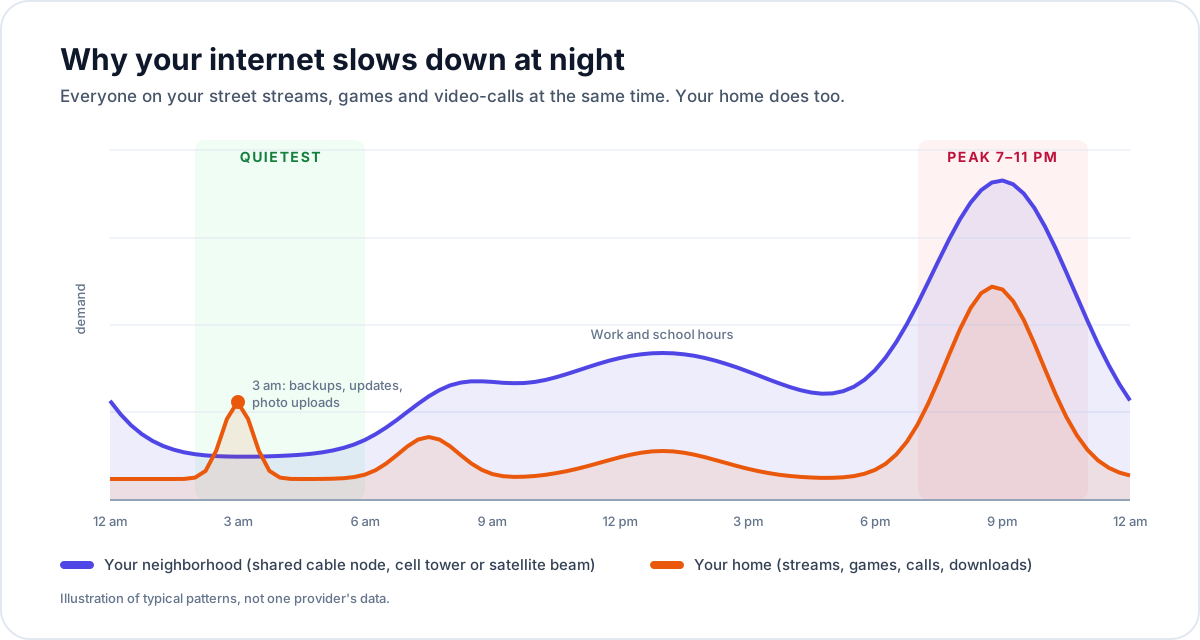
During the day, most people are at work or school and that shared capacity sits half empty. From about 7 pm, everyone gets home at once and starts streaming in 4K, gaming, scrolling video and video-calling family. Demand on the shared parts peaks between roughly 8 and 10 pm, then falls away after midnight. When demand gets close to what the shared part can carry, packets queue, speeds drop and lag rises.
What are peak internet hours?
In the US, peak internet hours are roughly 7 pm to 11 pm on weekdays, with the busiest hour usually between 8 and 10 pm local time. On weekends the busy period starts earlier, in the afternoon, and runs into the night. Peaks get bigger in winter, on holidays, during big live sports and streaming premieres, and on the day a popular game or console update comes out, when millions of people download tens of gigabytes at once.
The quietest hours are usually 2 am to 6 am. That's why routers, consoles and phones schedule their updates and backups then, and why your line's quietest hours are the best time for big downloads.
Step 1: is it your home, your neighborhood or the route?
"Internet slow at night" has three very different causes, and each has a different fix. The one test that separates them is a wired test at the slow time with your home quiet. It takes five minutes and saves hours of trying the wrong fix (or paying for a plan upgrade that changes nothing).
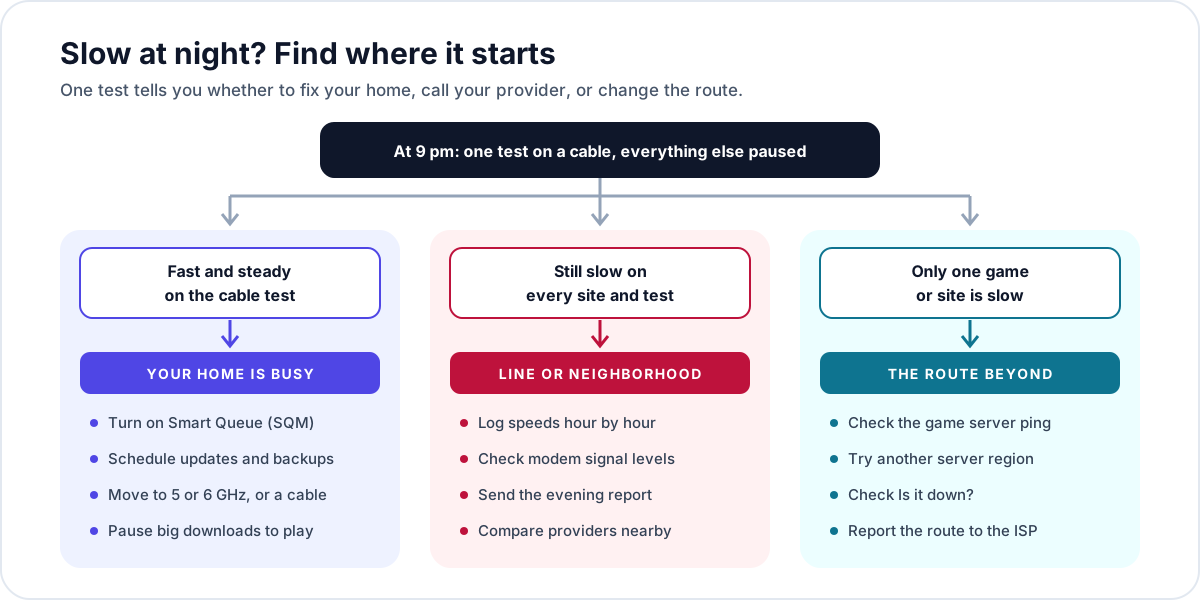
| Wired test at 9 pm, home quiet | Where the slowdown is | Go to |
|---|---|---|
| Fast and steady, low lag | Your home: busy devices, Wi-Fi or bufferbloat | Causes 1 to 3 |
| Fast, but lag under load jumps 30+ ms | Your connection's queue (bufferbloat), fixable at home | Cause 1: Smart Queue |
| Much slower than the morning on every test | The line or neighborhood is congested | Cause 4 |
| Speed tests fine, one game or site slow | The route beyond your provider | Cause 5 |
| Steady cap on video or after a data limit | Your plan's rules or traffic management | Throttling |
Two details make the test honest. Use a cable, because Wi-Fi is also busier at night (neighbors' networks come on too) and would blur the result. And really pause everything: a single phone uploading its camera roll or a console downloading an update can fill an upload of 10 to 20 Mbps on its own. The device check rules out the laptop itself.
Step 2: test your internet at different times of day
One evening test is a clue; a week of tests is proof. Test morning, afternoon and evening for a few days, always the same way (same device, same cable or the same spot). The speed test keeps your recent results in this browser so you can compare evenings with mornings, and it measures lag under load, the number that explains why games and calls suffer even when Mbps look fine.
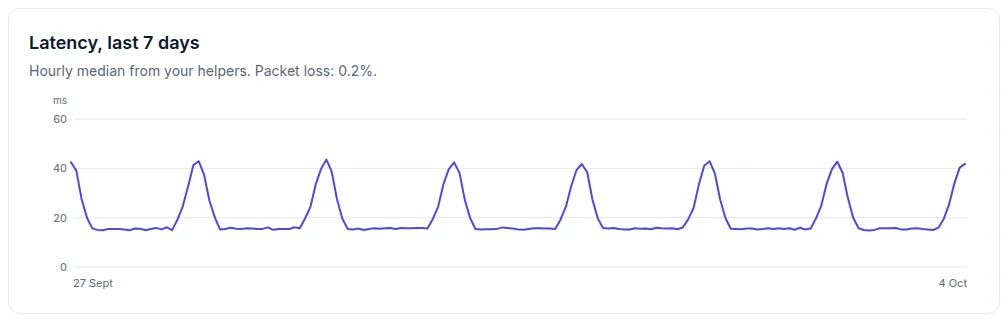
If you don't want to stay up testing, let a helper do it. The 24/7 monitor's helper runs on a PC, Mac, Raspberry Pi or NAS that stays on, checks latency every 15 seconds and runs a speed test every four hours. After a few days, the pattern is right there in the charts.
Cause 1: your own home is busier at night
Evenings are when everyone in your home is online at once. Three 4K streams, a video call, a game and a few phones scrolling video can add up to 100 Mbps or more, and that alone fills a smaller plan. More often, though, the problem isn't the total speed but what happens when the line is full.
| Activity | Typical use | What it needs most |
|---|---|---|
| Netflix or Disney+ in 4K | 15–25 Mbps per stream | Steady speed |
| YouTube in 4K | about 20 Mbps | Steady speed |
| HD streaming (1080p) | 5–8 Mbps per stream | Steady speed |
| Zoom, Teams or FaceTime HD | 2–4 Mbps each way | Low lag and loss, upload |
| Online gaming (during play) | under 1 Mbps | Low, steady lag |
| Game or console update | everything it can get | Nothing: it fills the line |
| Phone photo and video backup | everything it can get (upload) | Nothing: it fills the upload |
When one download takes everything it can, the router's queue fills and every other packet waits behind it. That's bufferbloat, and it's why a game lags the moment someone starts a download, even on a 1 Gbps plan. It's fixable at home: Smart Queue (SQM) on your router keeps the queue short, so games and calls stay smooth while downloads still run at nearly full speed. The bufferbloat fix explains it, the Smart Queue assistant gives exact settings for your router, and the router guides cover ASUS, TP-Link, Netgear, eero, UniFi and more.
Cause 2: updates, backups and uploads that run in the evening
Lots of devices wait for the evening to do their heavy lifting, exactly when you want to play or watch. The usual suspects:
- Phones uploading photos and videos. iCloud Photos and Google Photos upload when the phone is on Wi-Fi and charging, so the moment phones go on the charger in the evening, they start pushing gigabytes up a cable upload that may only be 10 to 35 Mbps.
- Consoles. PS5 rest mode and Xbox sleep mode download game updates in the background, and big patches often land in the evening, US time.
- PCs. Steam, Epic, Windows Update and macOS updates run whenever they can; Windows installs outside your "active hours".
- Cloud backups and sync: OneDrive, Google Drive, Dropbox, Backblaze and NAS backups.
- Security cameras and video doorbells uploading clips, all day and night.
Upload is the one to watch. Most cable plans have far less upload than download, and a full upload causes lag just like a full download. If your lag spikes in the evening and the speed test shows a high upload lag, look for something uploading. The background downloads guide shows how to schedule each of these for the small hours, and the monitor works out when your line is quietest:

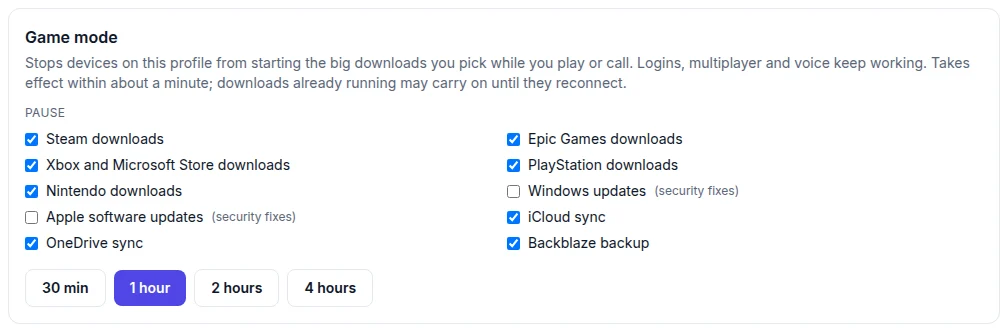
For downloads you can't schedule, pause them while you play. With Net Fix DNS, game mode stops devices on your profile from starting Steam, Epic, Xbox, PlayStation and Nintendo downloads, iCloud and OneDrive sync, or Backblaze backups for 30 minutes to 4 hours, then switches itself off. Security updates for Windows and Apple stay on by default. Net Fix DNS also shows which device started a big download.
Cause 3: Wi-Fi gets crowded at night
Your neighbors come home at night too, and their Wi-Fi gets busy at the same time as yours. In apartments and townhouses, dozens of networks can share the same few 2.4 GHz channels, so Wi-Fi that's fine at noon slows down and gets jittery at 9 pm. Your own Wi-Fi is also busier, with more devices taking turns to talk to the router.
- Use 5 GHz or 6 GHz (Wi-Fi 6E and Wi-Fi 7) for anything that matters. They have many more channels and walls stop neighbors' signals, which is a feature at night.
- Pick a less crowded channel, or let the router choose again in the evening rather than at noon.
- Move the router to the middle of the home, up high and out of cabinets; the Wi-Fi room check finds weak rooms.
- Put consoles, gaming PCs and TVs on a cable, or use a mesh system with a wired backhaul.
- Keep router firmware up to date. The Wi-Fi fix guide covers bands, channels and placement step by step.
How to tell it's Wi-Fi: the cable test at night is fine, but Wi-Fi tests at the same time are slow or jumpy. If only one device is slow, see is it my device or my internet?.
Cause 4: neighborhood congestion on your provider's network
If the wired test with your home quiet is still much slower at 9 pm than at 9 am, the shared part of your provider's network is running out of room at peak time. This is the one cause you can't fix at home, and it's more common on some connection types than others:
- Cable (Xfinity, Spectrum, Cox, Optimum): homes on one node share its capacity. When a node is overloaded, download speeds dip and latency rises every evening. The provider fixes this by splitting the node or upgrading it, but only once they know about it.
- 5G home internet (T-Mobile, Verizon, AT&T Internet Air): you share the tower with every phone around you, and some home internet plans are deprioritized behind phone traffic when the tower is busy. Evening slowdowns are common at crowded towers.
- Starlink: you share the satellite beam over your area. Busy cells slow down in the evening, and lower-priced plans can be deprioritized during congestion.
- DSL: usually steady, but some older networks have little capacity behind the neighborhood cabinet.
- Fiber (AT&T Fiber, Verizon Fios, Google Fiber, Frontier): rarely congested locally. If fiber slows at night, look at your home or the route first.
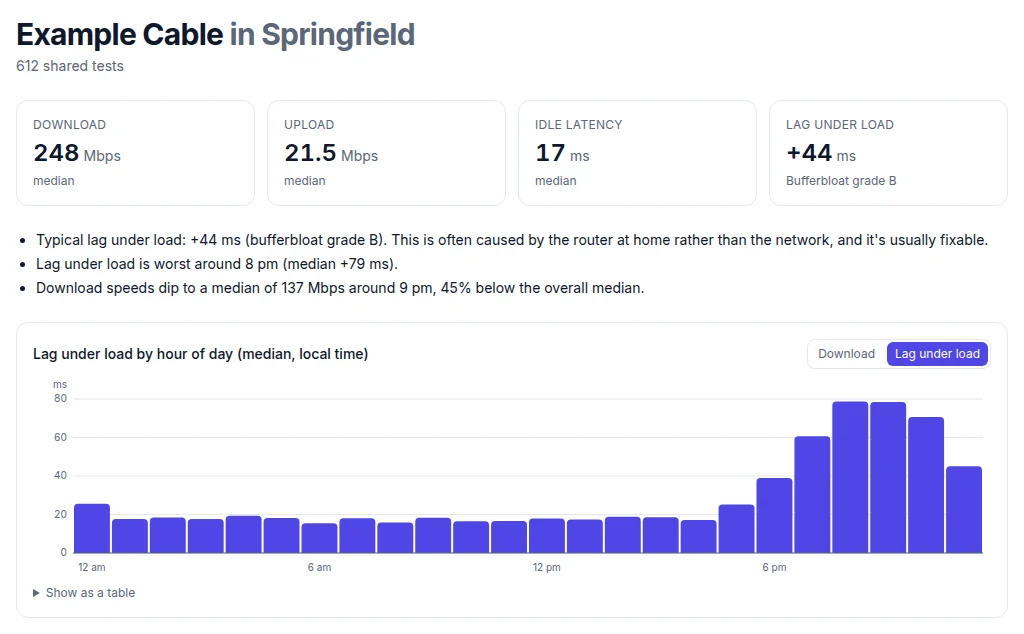
Shared, opt-in results show the same pattern across whole cities. Providers compared groups Lag Checks people chose to share by provider, city and hour of day, so you can see whether your provider's evenings are worse than its mornings where you live, and how other providers compare before you switch.
Cause 5: the route to one game or site is busy
Sometimes speed tests are fine at night but one game, one streaming service or one website is slow. Speed tests usually pick a server close by, often inside your provider's own network, so they don't see the links between your provider and everyone else. Those links (where networks hand traffic to each other) can get busy at peak time too, and then only traffic to certain places suffers.
- Check the game server and route check: it times regions across the US and the world and shows whether the trip to your game's region is longer than the distance explains.
- Try another server region in the game for a night. Which game server region should I pick? explains the trade-off.
- Check the service itself with Is it down?: game and streaming servers get busy in the evening too.
- For streaming, run the streaming check, which measures speed every second for 30 seconds and spots the dips that make video drop in quality.
A VPN sends your traffic along a different route, so if the normal route is congested at night, a VPN server near you can occasionally help one game or service. More often it adds distance and lag; test it both ways at the same time before keeping it. Does a VPN lower ping? goes deeper.
Is my ISP throttling me at night? How to tell
Throttling means your provider deliberately slows some of your traffic. It's different from congestion, which slows everyone on a busy network, and different from a busy home. Throttling on US home broadband is less common than people think, but these forms are real:
- Data limits. Most cable caps charge overage fees rather than slowing you, but satellite, mobile hotspot and some fixed wireless plans slow you down after a set amount of data each month. Check your usage in the provider's app.
- Deprioritization. Some 5G home internet, Starlink and mobile plans put your traffic behind other customers' when the tower or beam is busy. You're not slowed all the time, only at peak, which is why it shows up at night.
- Video management. Some mobile and hotspot plans hold video at a set quality, such as 480p or 1080p.
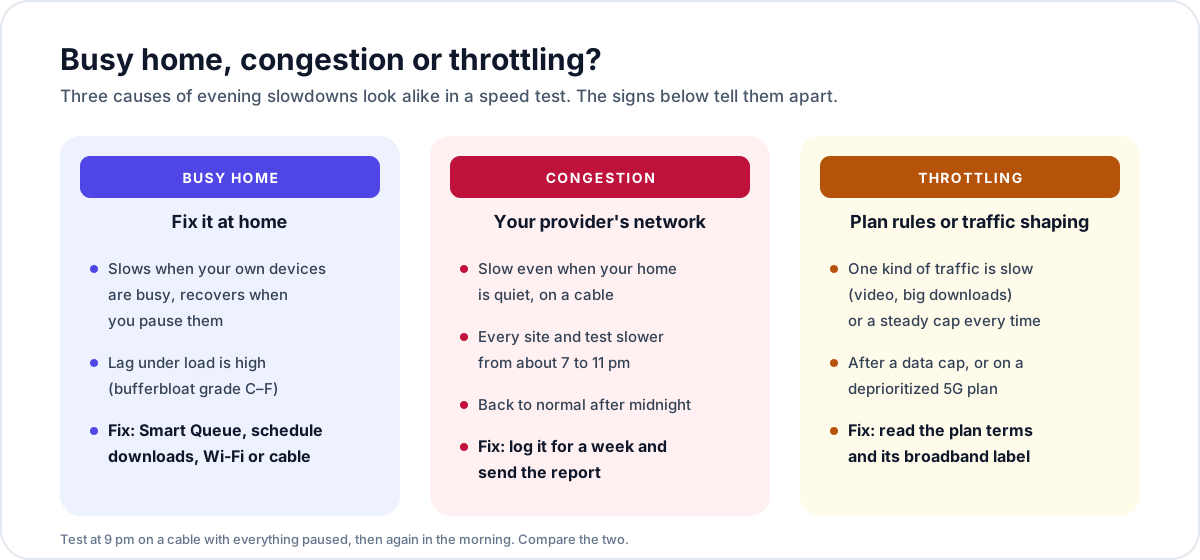
How to check: look for a steady, exact limit (video always at the same quality, a download stuck at the same speed every time) rather than speeds that wander up and down at peak. Compare a test with and without a VPN at the same time: if only the VPN test is good on video or downloads, something is treating that traffic differently. Then read your plan's broadband label. Since 2024, US providers must show a broadband "nutrition label" for each plan, with typical speeds, typical latency and links to their network management practices, which is where deprioritization and data limits are written down.
Why ping is higher at night, and games lag more
Gamers feel evenings first, because games need low, steady lag rather than lots of Mbps. Ping goes up at night for four reasons, in rough order of how often they're the cause:
- Bufferbloat at home: someone streams, uploads photos or downloads a patch, the queue fills and your game packets wait. Smart Queue fixes it; the game lag guide walks through it.
- Wi-Fi contention: more devices and neighbors' networks. Play on a cable.
- Congestion on the line, which adds a few to tens of milliseconds at peak.
- A busy route or server: the game's own servers and the links to them are busiest in the evening too.
Use Boost in the evening: it runs the lag checks in a row (spikes, server regions, connection type, calls) and places each finding in your home, on your line or beyond. Our per-game guides cover Valorant, Fortnite, Call of Duty and more, and high ping but fast internet explains why a fast plan doesn't lower ping.
Slow at night by connection: cable, fiber, 5G home internet, Starlink, DSL
- Cable: the most common evening slowdown. Turn on Smart Queue for upload and download, check that upload isn't full, and if the wired test is slow every evening, log it and ask for the node to be checked. The modem section of our drop-out guide shows how to read signal levels.
- Fiber: the line has plenty of room, so evening slowdowns are usually Wi-Fi, a busy home or the route beyond. Check the router first; many provider routers support Wi-Fi 6 or 7 but put everything on one crowded network.
- 5G home internet: move the gateway to a window on an upper floor facing the tower, read its signal in the app, and expect some evening slowdown at busy towers. Gamers should read is 5G home internet good for gaming?.
- Starlink: keep the dish clear of obstructions and check your plan's priority level. The Starlink guide explains how to add Smart Queue with your own router, and see why Starlink has lag spikes too.
- Satellite (Viasat, HughesNet) and hotspots: check whether you've passed a data threshold, and schedule big downloads for off-peak hours, which some plans don't count against your data.
- DSL: usually the steadiest at night, but the upload is small, so evening photo backups and uploads hurt most. Schedule them.
Slow on weekends, holidays and big release days
Weekends spread the peak across the afternoon and evening, so a line that's congested on weekday evenings can be slow from lunchtime on Saturday. Holidays, snow days, big live events and the release of a popular game or console update create the busiest hours of the year. If your internet is only slow on those days, it's almost always congestion somewhere upstream; if it's slow every weekend afternoon, look at who's home and what's running: the same fixes as Causes 1 to 3 apply.
When to call Xfinity, Spectrum, AT&T, Verizon or T-Mobile, and what to say
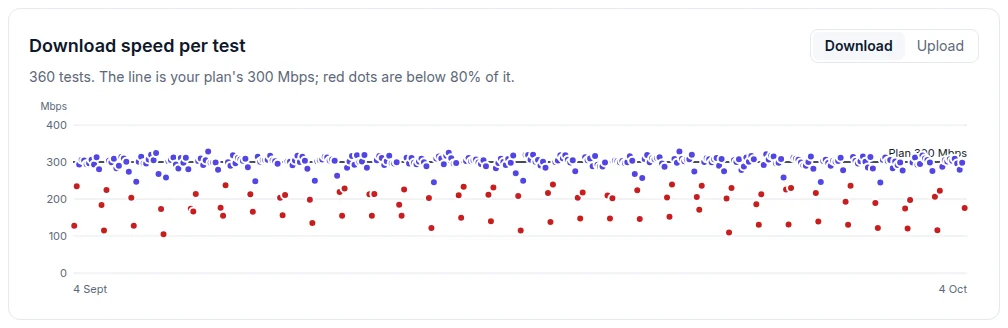
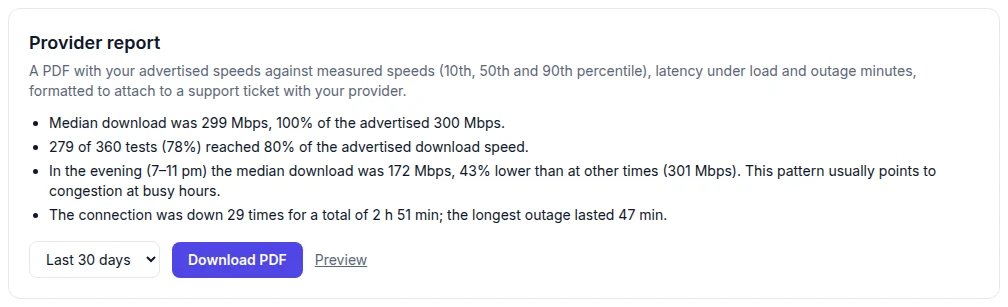
Call when the wired test with your home quiet is clearly worse every evening than in the morning, and Smart Queue and moving downloads haven't changed it. "My internet is slow at night" gets a remote reboot. Numbers get a ticket escalated: "On a cable with nothing else running, download drops from 300 to about 170 Mbps and latency doubles between 7 and 11 pm, every evening for two weeks. Here's the report."
- Set up the helper from the 24/7 monitor on a device plugged into the router with a cable, so Wi-Fi isn't part of the measurement.
- Enter your plan's advertised speeds so the report compares what you pay for with what you get, hour by hour.
- Let it run for at least a week, through weeknights and a weekend.
- Download the provider report and attach it to your ticket. Ask whether your node or tower is congested and when it's due for an upgrade.
- If nothing changes, check Providers compared for providers that hold up better in the evening where you live.
Only need one week of evidence? Lag Proof is a one-time purchase: the helper watches your connection for seven days and the report says whether evening lag starts in your home, on your line or beyond. That way you fix the right thing, or hand your provider evidence they can't brush off. How do I prove to my ISP that my internet is bad? has more tips.
How The Net Fix helps when your internet is slow at night
The Net Fix (thenetfix.com) is a set of free browser tools that find where a connection problem starts and walk you through the fix. For evening slowdowns, run Test & Optimize at the slow time to see whether the weak spot is in your home, on your line or beyond; the speed test to measure lag under load; the Smart Queue assistant to fix bufferbloat; and the game server check for one slow game. To prove a pattern, the 24/7 monitor logs your line hour by hour and finds its quietest hours. No app can make your plan faster than what you pay for, and we don't claim to; the goal is to find and fix the bottleneck, and lower lag where it can be lowered. The docs explain every tool, and the FAQ answers the common evening questions.
The "internet slow at night" checklist
- At 9 pm: one test on a cable, everything else paused. Repeat in the morning.
- Fine on the cable at night? Your home is the bottleneck: busy devices, uploads, Wi-Fi.
- Lag under load over 30 ms? Turn on Smart Queue with the Smart Queue assistant.
- Schedule console, PC and phone updates and backups for 2 to 5 am; pause the rest with game mode while you play.
- Move to 5 or 6 GHz, pick a quieter channel, and put the console on a cable. See the Wi-Fi fix guide.
- Only one game or site slow? Check the game server check and Is it down?.
- Steady cap on video or after a data limit? Read your plan's broadband label.
- Still slow on a quiet cable every evening? Run the 24/7 monitor for a week and send the report to your provider.
Run it at the time your internet is usually slow: one press checks speed, lag under load, packet loss, Wi-Fi and DNS, and tells you whether the problem is in your home, on your line or beyond.
Run Test & Optimize (free)Questions
Is it normal for internet to be slower at night?
A small dip at peak time is normal on shared connections like cable, 5G home internet and Starlink. A big, regular drop on a cable with your home quiet isn't, and it's worth reporting. Test at 9 pm and in the morning with the speed test to see how big yours is.
What time is internet the slowest?
Usually between 8 and 10 pm local time on weekdays, and from the afternoon on weekends. The quietest hours are about 2 to 6 am. The 24/7 monitor shows your own line's busiest and quietest hours.
Why is my internet slow at night but fine in the morning?
Either your home is busier at night (streams, uploads, Wi-Fi) or your provider's shared network is. A test on a cable with everything paused tells you which: fine means your home, slow means the line. Test & Optimize places the weak spot for you.
Does restarting the router help when internet is slow at night?
Only briefly, if the router itself has slowed down. A restart doesn't fix neighborhood congestion or bufferbloat. Smart Queue fixes bufferbloat; the Smart Queue assistant has the settings for your router.
Can my internet provider throttle me at night?
Some plans are deprioritized when the network is busy, which shows up at night, and some slow you after a data limit. Both are written in the plan's terms and broadband label. Congestion and a busy home are more common causes; the throttling section shows how to tell them apart.
Why is my Wi-Fi slow at night in my apartment?
Your neighbors' Wi-Fi networks get busy at the same time as yours and share the same channels, especially on 2.4 GHz. Move to 5 or 6 GHz, pick a quieter channel and use a cable for gaming. The Wi-Fi fix guide covers each step.
Does The Net Fix test my internet at night automatically?
The browser tools test when you run them. The 24/7 monitor's helper tests around the clock, including overnight, and shows evenings against mornings; Lag Proof does the same for a one-time week.