Is a gaming router worth it? When a new router lowers lag, and when it can't
The Net Fix · Updated · 11 min read
The short answer
A gaming router is worth it only if your lag gets worse when someone else uses the internet and your current router has no working Smart Queue or QoS. That is the one job a router does for lag. It can't shorten the distance to the game server, and the "gaming" label adds little: in RTINGS.com's tests, 9 of 11 ordinary and gaming routers cut lag under load once QoS was on. Test first with the speed test, which grades lag under load.
Key points
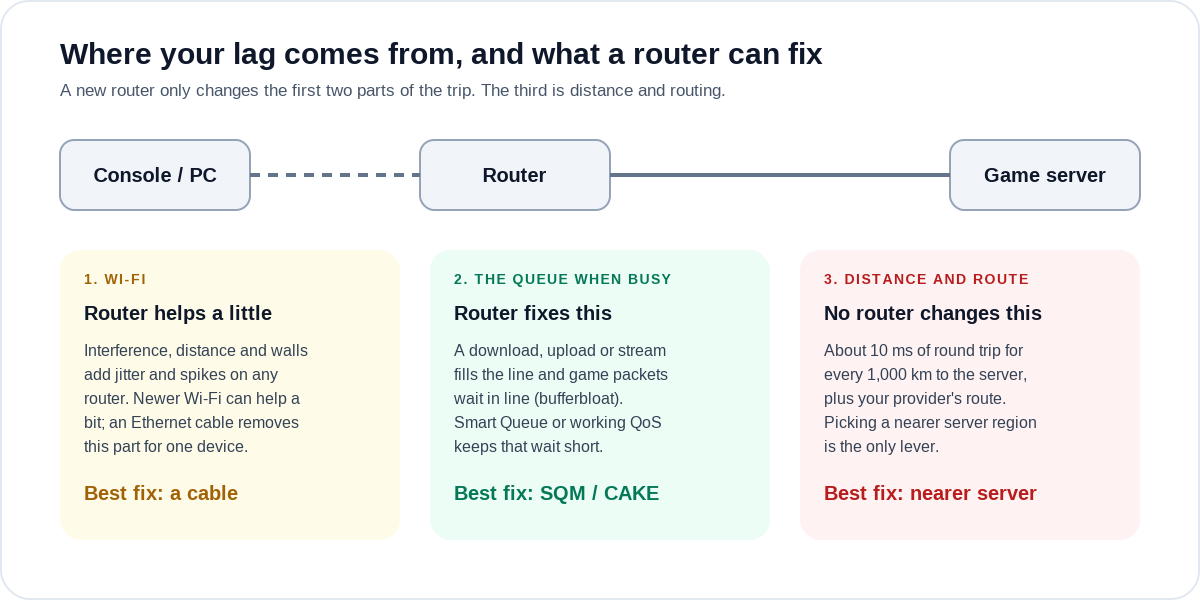
- A router only changes two parts of your lag: Wi-Fi between your device and the router, and the queue that builds up when the line is busy. Distance to the server and your provider's route are out of its reach.
- The queue is where a router clearly helps. Smart Queue (SQM, using fq_codel or CAKE) or a QoS feature that actually works keeps game packets from waiting behind downloads, uploads and streams.
- Most modern routers already have some QoS. In RTINGS.com's tests of 11 routers, every one lagged badly under load with QoS off, and 9 of 11 improved once it was turned on, gaming-branded or not.
- "Gaming" features such as a gaming port, Game Boost or a Geo-Filter mostly prioritise or filter traffic. Paid route services like WTFast change the route, which is a different thing from your home network.
- Buy a new router when yours has no working QoS or Smart Queue, no longer gets firmware updates, or can't keep up with your plan. Otherwise a cable and the right setting usually do more than a new box.
- If your lag is the same at 3 a.m. on an empty line as at 8 p.m., no router will fix it.
Do gaming routers actually reduce lag?
Sometimes, and for a narrower reason than the box suggests. The most useful public test we found is RTINGS.com's router latency research, published in 2025. It connected two game clients to a local Counter-Strike 2 server, limited the router's internet port to 50 Mbps so it would be the bottleneck the way it is in most homes, and then had another device download as fast as it could.
With the network quiet, the routers performed much the same: as long as nothing fills the line, even a modest router passes game packets without adding much delay. With the download running and QoS off, every one of the 11 routers gave what RTINGS called a very bad gaming experience. With QoS or SQM turned on, 9 of 11 brought latency back down. The two that didn't were the eero Max 7, whose QoS toggle showed no improvement in that test, and the Linksys E5400, which RTINGS thinks ran out of processor power.
Engadget reached the same conclusion in October 2026: gaming routers use the same Wi-Fi standards and often similar chips as other routers, and the traffic tools that help with lag are found on many non-gaming models too. The lesson is simple. What lowers lag is a working queue setting, not the word "gaming".
What makes a router a "gaming router"?
There's no standard for the label. Each brand bundles its own mix of features, usually with its own names. This is what the common ones do for lag, based on the makers' own help pages:
| Feature (example) | What it does | Does it lower lag? |
|---|---|---|
| Smart Queue / SQM with CAKE or fq_codel (GL.iNet Flint 2 and Flint 3, OpenWrt, Asuswrt-Merlin) | Shapes the line just under its real speed and keeps every queue short | Yes, when the line is busy. The most reliable fix for lag under load |
| Priority QoS (ASUS Adaptive QoS and Game Boost, Netgear Dynamic QoS, TP-Link QoS) | Lets game traffic or a chosen device go first | Often, when the line is busy. Results vary by model and firmware, so test it |
| Gaming LAN port (ASUS ROG) | Gives the device plugged into that port first priority | Only under load, and only for that device |
| Geo-Filter (Netgear Nighthawk Pro Gaming XR, DumaOS) | Blocks connections to game servers and players outside a radius you set | It can keep you off far-away servers. It doesn't make the trip to any server shorter |
| Route services (WTFast on ASUS ROG routers) | Sends game traffic over a different network to the server | Sometimes, if your provider's route is poor. ASUS offers it as a subscription |
| Newer Wi-Fi (Wi-Fi 6, 6E, 7) | More speed and less crowding on the air | A little for wireless devices. A cable still beats it |
| Faster processor and more ports | Keeps up with fast plans and many devices with QoS on | Indirectly: it lets Smart Queue run at your full plan speed |
What ASUS, Netgear and GL.iNet say their features do
ASUS describes its ROG gaming routers as having three levels of game acceleration: a gaming port, Game Boost (an adaptive QoS that makes game packets top priority) and, at the third level, a game-server route service, WTFast, offered as a subscription. Its general QoS page lists Adaptive QoS, Traditional QoS and a per-device Bandwidth Limiter; it doesn't mention CAKE. Our ASUS guide covers which of these helps and how Asuswrt-Merlin adds CAKE.
Netgear's help article on the Geo-Filter says it limits the distance to the game servers and players your console connects to. It also warns that a radius under 500 km (311 miles) may leave you unable to find games, and offers a Ping Assist option that lets in servers below a ping you choose, with 30 to 50 ms suggested. That's a matchmaking filter. It helps if your game keeps putting you on a distant server, and does nothing for a nearby one.
GL.iNet documents real Smart Queue on its newer routers: in the admin panel under Flow Control, SQM, from firmware 4.9, with CAKE recommended and the speeds entered in Mbps. The Flint 2 (GL-MT6000) and Flint 3 (GL-BE9300) are on its list of supported models. GL.iNet also notes that turning SQM on switches off Network Acceleration and may lower peak speed on fast lines, which is the usual trade-off. Our GL.iNet guide walks through it.
When is a gaming router worth it?
Look at what is actually causing your lag before you look at routers. This table covers the common situations:
| What you see | Is a new router worth it? | What to do first |
|---|---|---|
| Ping jumps when someone streams, downloads, uploads or joins a video call | Yes, if your router has no working Smart Queue or QoS | Turn on the QoS you already have and test again; buy only if it doesn't help |
| Lag grade stays C or worse even with QoS on | Yes, one with real SQM (CAKE or fq_codel) | Check the QoS applies to both download and upload |
| Your router is years old and gets no firmware updates | Yes, for security as much as lag | Pick one that still gets updates |
| Your plan is much faster than the router can shape | Yes, a stronger model | Compare speed with Smart Queue on and off |
| Spikes only on Wi-Fi, fine on a cable | Rarely | Use a cable, MoCA or a better spot for the router first |
| High ping even on an empty line | No | Check the server region and distance |
| Lag in one game only | Usually not | Check the game's server status and region |
| Strict NAT, can't join friends | No | Fix NAT with UPnP or port forwarding; check for double NAT |
How do I test whether my router is the problem?
This takes about ten minutes and tells you whether a router can help at all:
- Plug your PC or console into the router with an Ethernet cable, so Wi-Fi doesn't blur the result. Run the speed test while nothing else is using the line. Note the idle ping.
- Look at the lag-under-load grade. The Net Fix grades the ping added while the line is full: under 5 ms is A+, under 30 ms A, under 60 ms B, under 200 ms C, under 400 ms D, and anything above F. A or A+ means your router's queue is already fine; a new router won't lower your lag.
- If the grade is B or worse, turn on your router's QoS or Smart Queue. The Smart Queue assistant gives the limits to enter, starting at 90% of your measured speed.
- Run the test again. If the grade improves to A, you've fixed it without buying anything.
- If the grade barely moves, lower the limits to 85% and then 80%, and check both directions are set. If it still doesn't move, your router's QoS isn't controlling the queue. That is when a router with real Smart Queue is worth buying, or fix lag under load covers adding one in front of a gateway.
- If the idle ping itself is high, check where the delay is with the game server ping. A far server region is a distance problem, not a router problem.
When won't a new router help?
A router sits at the edge of your home. It has no control over anything beyond your internet connection. These are the cases where buying one is wasted money:
- The ping is high before anything else is running. That comes from the distance to the server and the route, which high ping but fast internet explains.
- Packet loss on the line itself, for example from a damaged cable outside or an ageing modem. How to fix packet loss shows how to find where it starts.
- Your provider's gateway still sits in front of the new router and does its own routing. You can end up with double NAT and the same queue as before; What is double NAT? covers the fix.
- The game server is struggling. Lag for everyone in a match, or in one game only, is not on your side. The is it down? check shows service status.
- Rubber banding or stutter from the device. Low frame rate, a hot laptop or background downloads on the console feel like lag but aren't the network; rubber banding in games separates them.
- Wi-Fi in a far room. A faster router helps a little, but a cable, MoCA or mesh does more; MoCA vs mesh vs powerline compares them.
What should I look for if I do buy one?
Skip the antennas and the RGB lights. For lag, these are the things that matter, in order:
- Real Smart Queue (SQM with CAKE or fq_codel), or a QoS feature that independent tests show working under load. bufferbloat.net, the project behind fq_codel and CAKE, lists OpenWrt, GL.iNet, eero, pfSense, OPNsense and Asuswrt-Merlin among the routers and firmware that include them.
- Enough processor power to run that queue at your plan's speed. Shaping happens on the router's CPU, and cheaper models often can't do it much above a few hundred Mbps. If you have a gigabit plan, check reviews that test speed with QoS on.
- Firmware updates. A router that still gets them is safer and its QoS keeps improving; one that doesn't is a reason to replace it on its own.
- Wired ports for the console and PC, and a 2.5 Gbps port only if your plan is faster than 1 Gbps.
- Bridge or access point mode, if you will keep your provider's gateway, so the two don't both route traffic.
| Option | Fixes lag under load | Fixes Wi-Fi spikes | Changes distance to the server |
|---|---|---|---|
| Router with real Smart Queue | Yes | A little | No |
| Gaming router with priority QoS only | Often; test it | A little | No |
| Mesh Wi-Fi system | Only if it has a queue setting | Yes, in far rooms | No |
| Ethernet cable to the console or PC | No | Yes, completely for that device | No |
| Paid route service or "ping booster" | No | No | Sometimes changes the route; can also add delay |
On route services and boosters, the same caution applies as for VPNs: they can only help when your provider's path to the server is poor, and they add a stop on the way. Does a VPN lower ping? explains how to test that before paying.
When this advice doesn't apply
- Starlink, 5G and other wireless home internet. Their speed changes minute to minute, so a fixed Smart Queue limit fits badly. GL.iNet and bufferbloat.net point to CAKE autorate for these lines.
- Provider gateways you can't replace. Some lines need the provider's box; then the gateway's own settings and bridge mode matter more than a new router. See the Xfinity gateway guide and the Spectrum and Cox guide.
- Dorms, apartments and shared buildings where you don't control the main router. A router of your own behind theirs can't shape the shared line.
- Buying for range, security updates or more devices. Those are good reasons to replace a router; they just aren't lag reasons.
See whether your lag rises when the line is busy before you buy anything. Free, in your browser.
Run the speed testQuestions
Do gaming routers lower ping?
Not on an empty line. A router can't shorten the distance to the game server, so idle ping is about the same with any decent router. What a good router lowers is the extra ping you get while someone else streams, downloads or uploads, through Smart Queue or working QoS.
Is a gaming router better than a normal router?
Not by being a gaming router. Gaming and non-gaming routers use the same Wi-Fi standards and often similar chips, and most have some QoS. Compare the features that matter for lag, real Smart Queue and enough processor power for your plan, rather than the label.
Will a new router fix lag spikes?
Only if the spikes come from a busy line or from Wi-Fi. Spikes that happen when someone else uses the internet are fixed by Smart Queue; Wi-Fi spikes are fixed best by a cable. Regular spikes on a wired connection with nothing else running usually come from elsewhere. Lag spikes every few seconds walks through the causes.
Do I need a gaming router for PS5 or Xbox?
No. Consoles need a wired connection or strong Wi-Fi, Open NAT and a router that keeps the line responsive when it's busy. Any router with working QoS or Smart Queue does that. Best router settings for PS5 and Xbox lists the settings.
What is the difference between QoS and SQM?
QoS is the general name for any setting that manages traffic, often by letting some devices or apps go first. SQM (Smart Queue Management) is a specific approach using fq_codel or CAKE that shapes the line just under its real speed and keeps every queue short. SQM is the more reliable fix for lag under load.
Is a Wi-Fi 7 router worth it for gaming?
Only if your gaming devices support Wi-Fi 7 and must stay wireless. Newer Wi-Fi can reduce crowding on the air, but a cable still has less jitter than any Wi-Fi. If the console is wired, the Wi-Fi standard doesn't affect its lag at all.
How much should I spend on a router for gaming?
Enough to get real Smart Queue that keeps up with your plan's speed, and no more. A mid-range router with SQM usually does more for lag than a premium gaming router with priority QoS only. Test the router you already have first; the fix may cost nothing.