What is double NAT? Does it cause lag, and how to fix it for gaming
The Net Fix · Updated · 14 min read
The short answer
Double NAT means two routers in a row each translate addresses, usually your provider's gateway and your own router behind it. It adds almost no ping. What it breaks is incoming connections: a console shows Strict or Type 3 NAT, port forwards fail, and party chat or hosting stops working. The fix is to let only one box route: put the gateway in bridge mode, or your own router in access point mode. The connection check shows your NAT type in a minute.
Key points
- Double NAT is a wiring and settings problem at home, not a line problem. Two boxes are both acting as the router.
- It does not add meaningful ping. Google's Nest help page puts the extra delay "on the order of milliseconds" and says most people notice nothing.
- It does block incoming connections, which shows up as Strict NAT on Xbox, NAT Type 3 on PlayStation, failed port forwards and games you can't host.
- You can check for it in two minutes: look at your router's WAN (internet) address. If it starts with 192.168, 10, or 172.16 to 172.31, there is another router in front.
- The clean fix is bridge mode on the provider's gateway. The fallback is access point mode on your own router. A DMZ pointed at your router is the last resort.
- If your router's WAN address starts with 100.64 to 100.127, that is your provider's shared address (CGNAT), which no home setting can remove.
What is double NAT?
NAT (network address translation) is what lets every device in your home share one public internet address. Your router holds the public address and gives each phone, PC and console a private one, such as 192.168.1.20. When a device sends something out, the router swaps the private address for the public one and remembers who asked, so the reply finds its way back.
Double NAT is the same thing done twice. A second router is plugged into the first, so the first router gives the second one a private address, and the second router creates its own private network behind that. NETGEAR's support page describes the result: because each router does NAT, "your network is split into two different private networks".
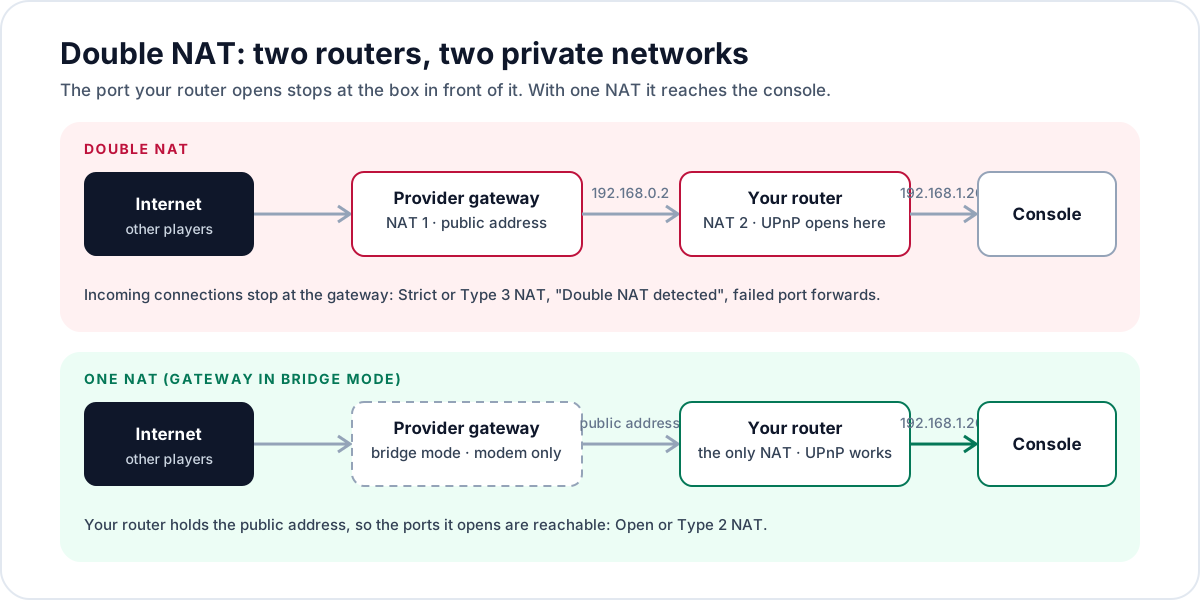
The usual ways people end up with it:
- You bought a gaming router or a mesh system and plugged it into the provider's modem-router box (a gateway) without changing anything on the gateway.
- A fiber or 5G home internet box that is a router itself has your own router plugged into it.
- An old router is being used to extend Wi-Fi to another floor, plugged in by its WAN (internet) port, so it routes instead of just passing traffic along.
- A travel router or a second router in a bedroom or office, added for more Ethernet ports.
A separate cable modem with one router behind it is not double NAT. A plain modem doesn't route, so the router gets the public address. That is why most Spectrum homes, which have a separate modem and router, don't have this problem, while homes with a combined gateway often do once a second router is added.
Does double NAT cause lag or raise ping?
Not in the way most people mean. Translating an address a second time takes a router a tiny amount of work. Google's Nest help page says a double NAT adds a very small delay, on the order of milliseconds, and that for most people it has no noticeable effect. If your ping is 80 ms and you want 30, removing double NAT won't get you there.
What double NAT does break is other players and services reaching you. Games, voice chat and consoles often need another device on the internet to start a connection to yours. Your router handles that with UPnP, which opens ports on request, or with port forwards you set by hand. Behind a second NAT, those openings exist only on your router. The gateway in front never hears about them, so the incoming connection is dropped there.
| What you notice | Is double NAT a likely cause? | What to check |
|---|---|---|
| Strict NAT on Xbox, NAT Type 3 on PlayStation | Yes, a common one | Router's WAN address, then the fixes below |
| "Double NAT detected" in Xbox network settings | Yes, the console has found it | The fixes below |
| Port forward set, but the port tests closed | Yes | Forward on both boxes, or remove one NAT |
| Can't host a game or a Minecraft server for friends | Yes | Same as above; also rule out CGNAT |
| Party chat won't connect, slow matchmaking | Often | NAT type on the console |
| A printer or PC on the other router can't be reached | Yes, they are on two separate networks | Put both on one network |
| High ping all the time | No | Server region, Wi-Fi, the route |
| Ping jumps when someone streams or uploads | No, that is the queue in the router | Smart Queue (bufferbloat fix) |
| Rubber banding, packet loss | No | Wi-Fi and the line |
There are two indirect ways double NAT can feel like lag. With a strict NAT, a game can match you with fewer players, so lobbies take longer to fill or you land in matches further away. And when two players can't connect directly, some games and most voice chats send the traffic through a relay server, which adds a detour. Both go away when the NAT type is fixed. Neither shows up as a higher number on a speed test.
How do I know if I have double NAT?
Three checks, from quickest to most certain. You only need one of them to say yes.
- Look at your own router's WAN address. Open your router's app or admin page and find the internet, WAN or status screen. The WAN IP is the address the router itself was given. If it is a private address, something in front of it is routing. The private ranges, set out in the internet standard RFC 1918, are 10.0.0.0 to 10.255.255.255, 172.16.0.0 to 172.31.255.255, and 192.168.0.0 to 192.168.255.255.
- Compare it with your public address. Open What is my IP? on any device at home. If the address shown there is different from your router's WAN address, there is at least one more NAT between your router and the internet.
- Run a trace. On Windows, open Command Prompt and type tracert 8.8.8.8 (on a Mac, traceroute 8.8.8.8 in Terminal). PCWorld's guide to double NAT describes how to read it: if the first two stops are both private addresses, two routers are doing NAT. One private stop followed by a public one is a normal single NAT.
Consoles also tell you. On Xbox, go to Profile & system, Settings, General, Network settings: the status area shows "Double NAT detected" when the console sees it, and Test NAT type shows Open, Moderate or Strict. On PS5, Settings, Network, Connection Status, Test Internet Connection shows NAT Type 1, 2 or 3; PlayStation doesn't name double NAT, but Type 3 with UPnP already on is a strong hint.
The Net Fix (thenetfix.com) connection check reads your NAT type from the browser and flags a shared provider address (CGNAT). It can't see how many routers are in your home, so use it for the result (open or strict) and the WAN address check above for the cause.
Is it double NAT or CGNAT?
They look alike from the console's side, and the fix is completely different, so sort this out before changing settings. CGNAT (carrier-grade NAT) is a NAT inside your provider's network: many customers share one public address. It is common on 5G home internet, satellite and some fiber and wireless providers.
| Double NAT at home | CGNAT at the provider | |
|---|---|---|
| Where the extra NAT is | A second router in your home | Inside the provider's network |
| Your router's WAN address | Usually 192.168.x.x or 10.x.x.x, handed out by the box in front | Often 100.64.x.x to 100.127.x.x, or another private address |
| Can you fix it yourself? | Yes, with bridge or access point mode | No. Ask the provider for a public IPv4 address, or use IPv6 |
| Does port forwarding work? | Only if set on both routers | No |
| Typical setups | Provider gateway plus your own router or mesh | 5G home internet, satellite, some fiber and wireless plans |
The range 100.64.0.0/10 (100.64.0.0 to 100.127.255.255) is reserved by the standard RFC 6598 for exactly this: the links between a provider's shared-address equipment and its customers. If your router's WAN address is in that range, you are behind CGNAT. A provider can also use a 10.x.x.x address for the same job, so a private WAN address when your router is plugged straight into a plain modem, with no second router in the home, also points at the provider.
You can have both at once: a 5G gateway that routes, your own router behind it, and CGNAT in front of both. Fix the part you control first, then see what the NAT type says. Lower ping on Starlink or 5G covers what helps on those connections.
How do I fix double NAT?
The goal is one device doing NAT. Work down this list and stop at the first option your equipment allows. After each change, restart the console and test the NAT type again.
1. Remove the extra router, if you don't need it
If the second router was only added for a few more Ethernet ports, replace it with a network switch. If the provider's box is a separate router plugged into a plain modem, unplug the provider's router and connect yours to the modem instead. Google's help page lists this as its recommended fix.
2. Put the provider's gateway in bridge mode
Bridge mode turns off the gateway's router so it works as a modem only, and your own router receives the public address. Both Google and NETGEAR recommend this over the alternatives; NETGEAR's wording is that bridge mode on the gateway gives the best network performance. The setting has different names: bridge mode on most cable gateways, IP passthrough on some AT&T gateways, modem mode on some others. On some gateways only the provider can switch it on.
Know what you give up. The gateway's own Wi-Fi and its app features stop, and any Wi-Fi extenders the provider supplied usually stop with it. Step-by-step instructions for the common US gateways are in Xfinity gateway lag and Spectrum or Cox router lag.
3. Put your own router in access point (bridge) mode
If the gateway can't be bridged, do it the other way round: let the gateway route and make your router or mesh a plain access point. NETGEAR's instructions for this case are to turn the gateway's Wi-Fi off and put the Orbi or Nighthawk in AP mode. On eero it is Settings, Advanced networking, DHCP & NAT, then Bridge. On Google Nest Wifi it is Wifi, Settings, Advanced Networking, Network mode, Bridge mode in the Google Home app.
This costs features, and the makers say so. NETGEAR notes that some router features are disabled in AP mode. eero lists its security, ad blocking, content filters and usage history among the things that don't work properly in bridge mode. Google marks the option "not recommended": it works only on a single Nest Wifi device that isn't part of a mesh, and Family Wi-Fi, device priority and the guest network are lost. The biggest loss for gaming is that your router can no longer run Smart Queue, because it isn't the router any more.
4. Last resort: DMZ or matching port forwards on the gateway
If neither box can be bridged, you can leave the double NAT in place and make the outer one transparent. In the gateway's settings, set the DMZ host to your own router's WAN address (and reserve that address on the gateway so it doesn't change). The gateway then passes every incoming connection to your router, and your router's UPnP and port forwards work again. PCWorld's guide describes this method.
Pointing the gateway's DMZ at your router is not the same as putting a console in a DMZ: your router's firewall still sits in front of everything in the home. The other choice is to forward the same game ports twice, once on the gateway to your router and once on your router to the console. That works but is easy to get wrong; the open port checker confirms whether a TCP forward reaches you from the internet.
| Fix | Works when | What you lose | Removes double NAT? |
|---|---|---|---|
| Remove the extra router | You don't need the second router | Nothing, or a few ports (use a switch) | Yes |
| Bridge mode on the gateway | The gateway offers it | Gateway Wi-Fi, its app features, provider extenders | Yes |
| Access point mode on your router | The gateway can't be bridged | Your router's Smart Queue, device controls and security features | Yes |
| Gateway DMZ pointed at your router | Neither box can be bridged | Nothing, but the gateway firewall no longer filters | No, but incoming connections work |
| Port forwards on both boxes | You need only a few fixed ports | Time; it breaks if addresses change | No, only those ports work |
Should I fix double NAT or leave it?
You can leave it when nothing is broken. If your console shows Open or Moderate NAT (Type 2 on PlayStation), party chat works, and you don't host games or forward ports, double NAT is costing you nothing you would notice. Browsing, streaming and most online games that connect out to a company's servers work through two NATs without trouble.
There is also a case where living with it is the better trade. If your provider's gateway can't be bridged and your own router has Smart Queue, switching your router to access point mode fixes the NAT type but gives up the one setting that stops lag when the line is busy. Smart Queue still works behind a gateway, because the queue it controls is the one on your line. In that setup, keep your router routing and use the gateway's DMZ, pointed at your router, for the NAT type. The Smart Queue helper gives the values to enter.
Fix it when the console reports Strict or Type 3, when you see "Double NAT detected", when a port forward tests closed, or when devices on the two networks need to find each other (a printer on one and a laptop on the other).
What if NAT is still strict after fixing double NAT?
- Check that UPnP is on in the router that now does the routing, then restart the console so it asks for its ports again.
- Use UPnP or manual port forwards for a game, not both for the same ports.
- Look at the router's WAN address again. If it is still private or in 100.64 to 100.127 with the gateway bridged, the remaining NAT is the provider's. Ask for a public IPv4 address (some providers offer one as an option), and turn on IPv6 on the router and console if both support it.
- Turn off any VPN on the console's connection or the router while you test; a VPN adds its own NAT. Does a VPN lower ping? explains what else it changes.
- Work through the console steps in Best router settings for PS5 and Xbox, which lists the ports and the order to try things in.
When this advice doesn't apply
- Apartment, dorm, hotel or office networks. The first router belongs to the building and you can't change it. Ask the network's owner whether a public address or a port forward is possible; otherwise only games that work behind strict NAT will behave.
- Mesh systems that are already access points. Extra mesh units from the same system don't create double NAT; only the main unit routes.
- Connections with CGNAT only. If there is one router in your home and the provider shares your address, nothing on this page will open the NAT. IPv6 or a public IPv4 address from the provider is the route.
- Lag with an Open NAT. The NAT type is fine, so the cause is elsewhere: Test & Optimize runs the lag checks in order and says where the delay starts.
See your NAT type and whether your provider shares your address, free, in your browser.
Run the connection checkQuestions
Is double NAT bad for gaming?
It is bad for connecting, not for ping. Double NAT blocks incoming connections, so a console can show Strict or Type 3 NAT, party chat can fail and you may not be able to host. The extra delay from the second translation is tiny. If nothing is failing, it can be left alone.
Does double NAT increase ping?
Barely. Google's Nest help page says a double NAT adds a very small delay, on the order of milliseconds. High ping comes from distance to the server, Wi-Fi or a busy line; the speed test shows which.
How do I fix "Double NAT detected" on Xbox?
Make one device do the routing. Put your provider's gateway in bridge mode so your own router gets the public address, or set your own router to access point mode. Then restart the Xbox and go to Profile & system, Settings, General, Network settings and run Test NAT type.
How can I tell double NAT from CGNAT?
Check the WAN address on the router closest to your devices. A 192.168.x.x or 10.x.x.x address handed out by another box in your home is double NAT, which you can fix. An address from 100.64.0.0 to 100.127.255.255 is your provider's shared address space (CGNAT), which only the provider can change. The connection check flags CGNAT.
Does bridge mode fix double NAT?
Yes. Bridge mode on the provider's gateway turns off its router, so your own router becomes the only NAT. You lose the gateway's Wi-Fi and app features. Bridge mode by itself doesn't lower lag; that comes from Smart Queue on the router that takes over.
Will port forwarding work with double NAT?
Only if the port is forwarded on both routers: from the gateway to your router, then from your router to the device. A forward on your own router alone never reaches the internet. The open port checker shows whether a TCP port is reachable.
Is it safe to put my router in the gateway's DMZ?
It is safer than putting a console or PC in a DMZ, because your own router's firewall still protects every device behind it. Keep your router's firmware up to date and its remote administration off. Use it only when neither the gateway nor your router can be switched to bridge mode.
Does a mesh Wi-Fi system cause double NAT?
It can. If the main mesh unit is plugged into a provider gateway that also routes, both do NAT. Bridge the gateway, or put the mesh in bridge or access point mode, keeping in mind that some mesh features stop working in that mode.