Is UPnP safe? Should you turn UPnP on for gaming, or forward ports by hand?
The Net Fix · Updated · 12 min read
The short answer
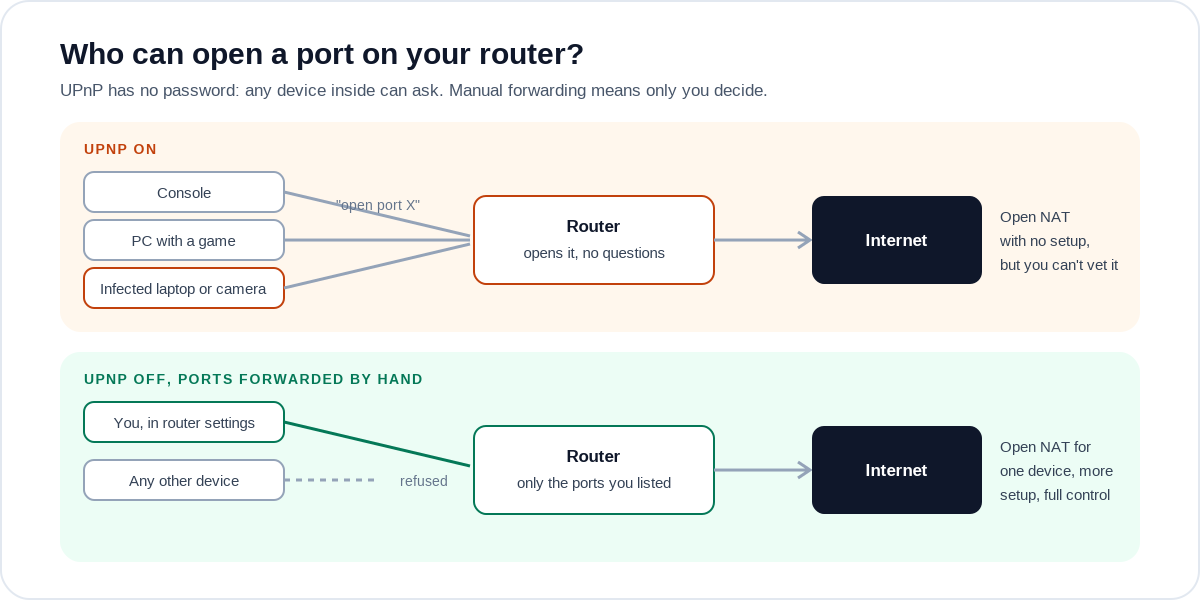
For most gamers, UPnP is safe enough to leave on if the router's firmware is current and every device at home is trusted. Its weakness is that it has no password: any device on your network, including one with malware, can ask the router to open a port. Old router bugs that answered UPnP from the internet were worse, and firmware updates fixed them. If you want full control, turn UPnP off and forward only the ports your game lists. Neither choice changes your ping. The connection check shows your NAT type before and after.
Key points
- UPnP (Universal Plug and Play) lets a console or PC ask your router to open the ports a game needs, so you get Open NAT without setting anything up.
- The protocol has no authentication. CERT/CC, the US vulnerability coordination center at Carnegie Mellon, notes that UPnP was designed for trusted local networks and does not check who is asking.
- The big UPnP attacks hit routers whose UPnP answered from the internet side because of a firmware bug. That is a different problem from UPnP on your home network, and firmware updates are the fix.
- CISA, the US Cybersecurity and Infrastructure Security Agency, advises home users to turn UPnP off after a device that needed it is set up. TP-Link's own guidance says to keep it on for online gaming with current firmware.
- Manual port forwarding is the safer middle ground: only you open ports, to one reserved address. It takes ten minutes per console.
- UPnP and port forwarding fix connection problems (Strict NAT, party chat, hosting). Neither lowers ping or lag once you are in a match.
What does UPnP do for gaming?
Your router blocks connections that start from the internet. That is good for security, but online games, voice chat and peer-to-peer matchmaking often need another player's console to reach yours. To let that happen, a port on the router has to point at your console.
UPnP does that automatically. When a game starts, the console sends a request to the router over the home network: open this port and send what arrives to me. The router adds the rule without asking you. Xbox shows the result as Open, Moderate or Strict NAT; PlayStation shows Type 1, 2 or 3. With UPnP working, most homes behind a single router get Open NAT on Xbox and Type 2 on PlayStation, both of which connect with everyone.
Without UPnP and without manual forwards, the console usually ends up at Moderate or Strict NAT. Games still work, but you may fail to join some friends, party chat can drop, and hosting a lobby or a Minecraft server for others can fail.
Is UPnP safe? What the risks really are
There are two separate risks, and most articles mix them up. One is about devices inside your home. The other is about bugs in the router itself.
Risk 1: any device inside can open a port
UPnP trusts every device on your network. CERT/CC's note on the 2020 CallStranger flaw puts it plainly: UPnP is meant for trusted local networks and has no authentication. TP-Link's 2026 guide on UPnP says the same and adds that it lowers your visibility into which ports are open.
So if a laptop picks up malware, or a cheap camera or smart plug has a hole in it, that device can ask the router to open a port to itself, and the router will. CISA's home network guidance warns that attackers can use UPnP to spread malware to devices on your network and control them remotely. This only matters once something inside is already compromised, but UPnP then makes it easier for that device to be reached from outside.
Risk 2: a router that answers UPnP from the internet
UPnP should only listen on the home side of the router. Some routers, through firmware bugs, also answered on the internet side. Anyone on the internet could then add port rules to them. This is what the headline UPnP attacks were about:
- In January 2013, CERT/CC published VU#922681: buffer overflows in a widely used UPnP library (libupnp) that let a remote attacker run code or crash the device. Rapid7's research, quoted in the note, found the library in tens of millions of devices and "approximately twenty million" of them exposed directly to the internet.
- In November 2018, Akamai reported that 277,000 of a pool of 3.5 million devices were still running vulnerable UPnP, and 45,113 routers had confirmed malicious port rules injected, exposing an estimated 1.7 million computers behind them. Akamai named the campaign EternalSilence.
- In June 2020, CERT/CC published CallStranger (CVE-2020-12695), a flaw in the UPnP SUBSCRIBE feature that could be abused for denial-of-service attacks and data theft. The Open Connectivity Foundation updated the UPnP specification on April 17, 2020 to fix it.
All three are bugs in routers or the software inside them, fixed by firmware updates. They are the reason security agencies say to turn UPnP off on old or unpatched routers. A current router from a maintained brand, with UPnP answering only on the home side, does not have them.
| Devices inside open ports | Router answers UPnP from the internet | |
|---|---|---|
| Who can open ports | Any device on your network | Anyone on the internet |
| Needs something already infected? | Yes, a device inside | No |
| Known examples | Malware on a PC, weak cameras and smart plugs | libupnp flaws (2013), UPnProxy and EternalSilence (2018) |
| Fixed by a firmware update? | No, it is how UPnP works | Yes, on routers that still get updates |
| What reduces it | Trusted devices, a guest network, or manual forwarding | Current firmware, or a newer router |
What do CISA, CERT and router makers say about UPnP?
The advice points the same way, with different defaults depending on who it is written for:
| Source | What it says | Who it is written for |
|---|---|---|
| CISA, Project Upskill home Wi-Fi module | Turn UPnP off; you may need it to add a device, then disable it again. Also update firmware, turn remote management and WPS off. | Home users who want the safest setup |
| CERT/CC VU#922681 | Disable UPnP if it is not necessary; block untrusted hosts from UDP port 1900; update the UPnP library | Router makers and administrators |
| CERT/CC VU#339275 (CallStranger) | Disable UPnP on any internet-facing interface; keep the router firewall on; watch for firmware updates | Router makers and administrators |
| MiniUPnP project (used in many routers) | Update to the latest version; SSDP and HTTP/SOAP ports should be reachable from the home network only | Router makers |
| TP-Link, "What Is UPnP, and Should You Enable It on Your Router?" (June 2026) | Most home users can turn it off; keep it on for online gaming, media servers and some smart home devices, with current firmware and a strong password | Home users |
None of these sources says UPnP on a patched router is dangerous for a gamer by itself. They say it widens what a compromised device can do, and that it should never be reachable from the internet.
Should I turn UPnP on for gaming?
It depends on what is on your network and how much setup you are willing to do. This table covers the common cases:
| Your situation | Our suggestion | Why |
|---|---|---|
| A console or gaming PC, router still getting firmware updates, devices you trust | UPnP on is fine | You get Open NAT with no setup; the inside risk is small |
| Router with no firmware update in years, or end-of-life | UPnP off, forward ports by hand, plan a router upgrade | Old UPnP code is where the internet-facing bugs were |
| Many smart cameras, plugs or cheap gadgets on the same network | UPnP off, or move those gadgets to a guest network | A weak gadget is the device most likely to misuse UPnP |
| One console, you want full control | UPnP off, forward that console's ports to a reserved IP | Only you open ports, and only to one address |
| Several consoles or PCs playing the same game at once | UPnP on | Manual forwards can point a port at one device only |
| Small business or home office with work data | UPnP off | Follow CISA's advice; forward only what a service needs |
| Strict NAT even with UPnP on | Check for double NAT or CGNAT first | UPnP can't open a second router or the provider's NAT |
How do I keep UPnP on more safely?
If you keep UPnP on, these steps cut down most of the risk. They follow the CISA and CERT/CC advice above:
- Update the router's firmware, and turn on automatic updates if the router has them. If the router no longer gets updates, treat that as the reason to replace it.
- Turn off remote management (remote administration, web access from WAN) so the router's settings page can't be reached from the internet.
- Look for a setting that limits UPnP to the home network. Routers name it differently; on some it is simply how UPnP works and there is no switch.
- Put smart cameras, plugs and other gadgets that only need the internet on a guest network, as CISA suggests, so they are kept apart from your PCs and consoles.
- Look at the list of UPnP rules now and then. Many routers show it next to the UPnP switch or in the port forwarding page. A rule for a console or game you recognise is normal; a rule for a device you don't know, or for ports such as 445 or 3389, is not. The exposure scan checks whether risky TCP ports like these answer on your public address.
- If you find rules you didn't expect, turn UPnP off and restart or reset the router. Akamai's EternalSilence write-up notes that turning UPnP off may not remove rules already injected.
- Keep Windows and other devices updated, since UPnP only becomes a problem once something inside is compromised.
One limit worth knowing: UPnP discovery listens on UDP port 1900. Our open port checker and exposure scan test TCP only, so they can't tell you whether your router answers UPnP from the internet. Current firmware is the practical check.
How do I turn UPnP off and forward ports instead?
This gives the same Open NAT for one device without letting anything else open ports:
- In the router's app or settings page, give the console or PC a reserved IP address (also called a DHCP reservation or static lease), so the forward always reaches it.
- Look up the ports. Each game page lists the publisher's ports, for example Call of Duty, Fortnite and Minecraft. Consoles have their own lists too; Best router settings for PS5 and Xbox gives them.
- Add a port forward for each port or range to the reserved address, with the right protocol (TCP, UDP or both).
- Turn UPnP off and save. Restart the console or PC.
- Test NAT type on the console, and check a TCP port with the open port checker while the game is running. A closed port usually means a typo, the wrong address, or a second router in front.
Use one method per device. If UPnP stays on and you also forward the same ports by hand, the two can clash and the console may report a UPnP error.
Where is the UPnP setting?
| Router | Where UPnP is | Source |
|---|---|---|
| ASUS | WAN > Internet Connection > Basic Config > Enable UPnP | ASUS FAQ 1011715 |
| TP-Link (Archer, web interface) | Advanced > NAT Forwarding > UPnP | TP-Link FAQ 1543 |
| Other brands and provider gateways | Usually under Advanced, WAN, NAT or Firewall; check the model's help page | Varies by model and firmware |
Is UPnP safer than DMZ or port triggering?
Yes, compared with a DMZ. Putting a console or PC in the DMZ sends every unsolicited connection from the internet to it, on every port. UPnP opens only the ports a game asks for, and manual forwarding only the ones you list. A DMZ for your own router behind a provider gateway is a different case, covered in What is double NAT?.
| Method | Who opens ports | Effort | Risk |
|---|---|---|---|
| UPnP | Any device on the network, automatically | None | Low on a patched router with trusted devices |
| Manual port forwarding | You, for one address | Ten minutes per device | Lowest of the methods that give Open NAT |
| Port triggering | The router, after a set outgoing port is used | Medium; not on every router | Low, but it opens only after your device sends first, so it can miss incoming-first connections |
| DMZ host | Everything goes to one device | Low | Highest: every port reaches that device |
| Nothing (UPnP off, no forwards) | No one | None | Lowest, but Moderate or Strict NAT |
When this advice doesn't apply
- Your provider shares your public address (CGNAT). UPnP and port forwards on your router can't open the provider's NAT. The connection check flags it.
- There are two routers in a row. UPnP opens ports only on the router the console talks to. See What is double NAT? for the fix.
- Dorm, apartment, hotel or office networks. You don't control the router, so UPnP is whatever the network's owner set.
- A VPN on the console or PC. The VPN has its own NAT, and your router's UPnP doesn't apply to traffic inside it.
- Lag, not connection trouble. If NAT is already Open and the game still stutters, Test & Optimize runs the lag checks in order and says where the delay starts.
See your NAT type and whether your provider shares your address, free, in your browser.
Run the connection checkQuestions
Is it safe to have UPnP on?
On a router that still gets firmware updates, with devices you trust, it is a reasonable choice for gaming. Its weakness is that any device on your network can open ports without a password, so a device with malware could misuse it. CISA advises turning it off when nothing needs it.
Should I turn UPnP on for PS5 or Xbox?
If you see Strict or Moderate NAT on Xbox, or NAT Type 3 on PS5, turning UPnP on is the quickest fix. Restart the console afterwards and test NAT again. If you'd rather keep UPnP off, forward the console's ports to a reserved IP instead; Best router settings for PS5 and Xbox lists them.
Does UPnP affect ping or lag?
No. UPnP changes whether other players can reach your console, not how long packets take. Ping stays the same with it on or off. Lag that rises when the line is busy is bufferbloat; the speed test grades it.
Can hackers use UPnP?
Yes, in two ways. Malware already on a device in your home can use UPnP to open ports to itself, and routers with old UPnP bugs could be changed from the internet. Akamai found 45,113 routers with injected port rules in 2018. Current firmware fixes the second problem; trusted devices limit the first.
Is manual port forwarding safer than UPnP?
Yes. With manual forwarding, only the ports you choose are open, and only to the address you set, so no other device can add more. The cost is setup time and keeping the list up to date. The open port checker confirms a TCP forward works.
Will turning off UPnP break anything?
It can. Consoles may drop to Moderate or Strict NAT, some games won't let you host, and media servers or smart home devices that use it for remote access can stop working from outside. Forward the ports those devices need, or turn UPnP back on if you rely on them.
Does turning UPnP off remove the ports it opened?
Usually, but not always. Akamai's EternalSilence research notes that disabling UPnP may not clear port rules that were injected, and recommends restarting or resetting the router with UPnP off. Check the router's UPnP or port forwarding list afterwards.