Fiber vs cable for gaming: which has lower ping, and is the difference worth switching for?
The Net Fix · Updated · 11 min read
The short answer
Fiber is better for gaming than cable, but by less than most ads suggest. In the FCC's US measurements, fiber's idle ping to a nearby server was 8 to 14 ms and cable's 13 to 22 ms, a gap of roughly 5 to 10 ms. The bigger differences are upload speed and how much ping rises when the line is busy. A cable line with Smart Queue can play as well as fiber. The speed test shows your ping while the line is busy.
Key points
- Fiber has the lowest ping of the wired home connections in the US. Cable is close behind, and DSL is clearly slower to respond.
- The gap between fiber and cable at idle is about 5 to 10 ms in the FCC's measurements. In a game that is small next to distance to the server, which adds about 10 ms for every 1,000 km there and back.
- Fiber's real advantage for gaming is upload. Many fiber plans upload as fast as they download, while cable plans usually upload a small fraction of their download speed, so a backup or a stream fills them sooner.
- What makes a match lag on any connection is usually a full line (bufferbloat) or Wi-Fi, not the cable or fiber itself. Both are fixable at home.
- Switch to fiber if it costs about the same, if several people upload at once, or if you stream your play. Don't switch only to shave a few milliseconds off an already steady ping.
Does fiber have lower ping than cable?
Yes, a little. The most useful independent data in the US comes from the FCC's Measuring Broadband America program, which puts test boxes in thousands of volunteers' homes and measures the connection from the home router. Its Thirteenth Fixed Broadband Report, using data from September and October 2022, found that idle latency was lowest for fiber providers (7 to 14 ms), higher for cable (12 to 24 ms) and higher again for DSL (23 to 34 ms).
The same report also breaks the results down by technology and by advertised speed. Grouped that way, fiber's weighted median idle latency ranged from 8 to 14 ms, cable's from 13 to 22 ms and DSL's from 20 to 61 ms, with the slowest DSL tiers at the top of that range. The report adds that faster speed tiers generally had lower idle latency, because each packet takes less time to send.
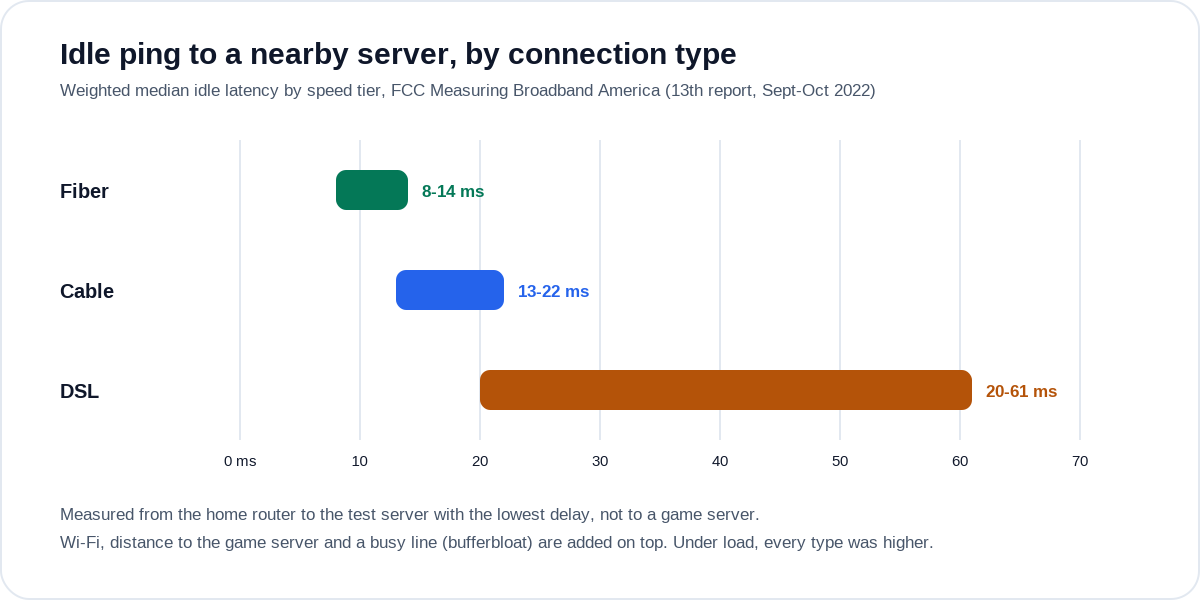
Two things about those numbers matter for a gamer. First, they are measured to the test server with the lowest delay, usually a nearby one, so they show what the connection itself adds, not your ping in a match. Second, they are measured from the router, so Wi-Fi inside your home is not included. Wi-Fi can add more delay and far more variation than the difference between fiber and cable; Ethernet vs Wi-Fi for gaming covers that part.
Why does fiber have lower latency than cable?
Both carry your data over fiber for most of the trip. A cable provider runs fiber to a node in your neighborhood and uses coaxial cable only for the last stretch to your home. The difference comes from how that last stretch shares time between homes.
On cable (DOCSIS), your modem can't send whenever it likes. It first asks the provider's equipment for a time slot, then sends in that slot. RFC 8034, the cable industry's published description of its queue management for modems, says this request-grant step typically adds about 4 to 8 ms of latency to upstream traffic. Fiber has its own way of sharing the line between homes, and the FCC's measurements show it adds less delay.
DSL runs over the old copper phone line, which was built for voice, not data. It sits at the top of the FCC's ranges, and the report found its slowest speed tiers had the highest latency of all.
Fiber vs cable vs DSL for gaming: side by side
| What matters in a game | Fiber | Cable | DSL |
|---|---|---|---|
| Idle ping to a nearby server (FCC) | 8-14 ms | 13-22 ms | 20-61 ms |
| Upload speed | Often the same as download | Usually a small fraction of download | Low on most plans |
| Ping when the line is busy | Rises least, because there is more upload headroom | Can rise a lot when the upload fills, unless Smart Queue or the provider's queue management handles it | Rose the most in the FCC's latency-under-load results |
| Shared with neighbors | Shared optical network, rarely the bottleneck | Shared neighborhood node, can be busy in the evening | Your own line to the exchange or cabinet |
| Good for competitive shooters | Yes | Yes, when the line isn't full | Playable on short lines; long lines struggle |
| Good for streaming your play | Yes | Depends on the upload of your plan | Rarely |
Satellite and 5G home internet aren't in this table because they behave differently: the radio link adds more delay and more variation. How to lower ping on Starlink and 5G covers those.
How much does the fiber vs cable difference matter in a game?
Usually less than distance. Light in fiber covers about 200 km per millisecond, so every 1,000 km between you and the game server adds about 10 ms of round-trip ping that no connection type can remove. Picking the closest server region often saves more than switching from cable to fiber.
A worked example
Say you live about 1,500 km from the game's nearest data center. That distance alone is about 15 ms there and back, and real routes are longer than a straight line, so 20 to 30 ms is a normal result. Add the connection itself: roughly 10 ms on fiber or roughly 17 ms on cable, using the middle of the FCC's ranges. You end up near 30 to 40 ms on fiber and 37 to 47 ms on cable. Both are fine for every game, including fast shooters.
Now someone in the house starts a cloud backup. On a cable plan with a small upload and no queue management, the upload fills and your ping can jump by 100 ms or more for as long as the backup runs. On a fiber plan with a large upload, the same backup may fill only part of the line. That jump, not the 7 ms at idle, is the difference you actually feel. What is loaded latency? explains how to read it.
Why upload speed and bufferbloat matter more than fiber vs cable
The FCC report is clear that latency under load (it calls it working latency) was higher than idle latency, with a more pronounced difference for DSL. It also notes that some providers have since added active queue management to their networks, which improved later results. Queue management is the network-side version of the Smart Queue setting on a home router: it stops a full line from building a long queue in front of your game packets.
On cable, the modem matters here. RFC 8034 says the DOCSIS 3.1 specification requires cable modems to use a queue management method called DOCSIS-PIE on upstream traffic, aiming for 10 ms of queueing delay unless the provider sets something else. For older DOCSIS 3.0 modems it is only recommended. So a cable customer on an old DOCSIS 3.0 modem is more likely to see big ping jumps while uploading than one on a DOCSIS 3.1 modem.
How to test whether your connection is the problem
Before paying for a new line, find out which part of the path is adding the lag. These steps take about ten minutes.
- Plug the PC or console into the router with a cable, or stand next to the router, so Wi-Fi is out of the picture.
- Run the speed test with nothing else using the connection. Note the idle ping and the ping during download and upload.
- If idle ping is low but ping during upload jumps by more than about 30 ms, the problem is a full line (bufferbloat). Smart Queue fixes this on fiber and cable alike.
- Run the game server check to see your ping to the regions games use. If only far regions are high, that's distance, and no connection type changes it.
- Run the lag spike finder for a few minutes. Spikes on a cable line that come back every evening point at a busy neighborhood node; spikes that follow Wi-Fi use point at your home.
- If idle ping to a nearby region is well above the FCC ranges for your connection type, call the provider with your dated results: that part is theirs.
Not sure where the lag comes from? Test & Optimize runs every check in order and tells you whether it is your home, your line or beyond.
Run Test & OptimizeShould you switch from cable to fiber for gaming?
| Your situation | Will fiber help? | Try first |
|---|---|---|
| Ping jumps when someone uploads, backs up or streams | Yes, the bigger upload helps | Smart Queue on your router, which may fix it for free |
| You stream your play to Twitch or YouTube | Yes, upload is the limit on many cable plans | Check your cable plan's upload; a higher tier may be enough |
| Lag every evening, fine in the morning | Often, if the cable node is busy | Test at both times to confirm it's the line |
| Ping is high to one far region only | No, that's distance | Pick a closer server region |
| Lag only on Wi-Fi | No | Use a cable or fix the Wi-Fi |
| Steady 30-40 ms ping, no spikes | Barely noticeable | Nothing; your line is fine for gaming |
If fiber costs about the same as your cable plan, it is the better line for gaming and for everything else at home. If it costs more, decide by the table: the upload and the steadier evening behavior are worth paying for, a few milliseconds of idle ping usually isn't. Is 100 Mbps good for gaming? covers how much speed you need on either.
How to get the lowest ping on cable or fiber
- Use a cable to the gaming device, or at least strong 5 GHz Wi-Fi close to the router. Fix Wi-Fi lag has the settings.
- Turn on Smart Queue on your router, with limits a little below your measured speeds. The router guides show where it is for each brand.
- On a rented cable gateway with no Smart Queue, see the Xfinity gateway guide or the Spectrum and Cox guide for bridge mode and your own router.
- On cable, check that your modem is DOCSIS 3.1. Your provider's app or the label on the modem shows the model.
- On fiber, plug your router into the provider's box with Ethernet, and don't put a second router behind theirs without bridge mode; double NAT doesn't add ping but breaks NAT type.
- Schedule big downloads and backups for when nobody plays. Find what's using your bandwidth if you don't know what fills the line.
When this advice doesn't apply
- Fixed wireless, 5G home internet and satellite behave differently from both fiber and cable, with more variation from the radio link.
- Some fiber is fiber only to the street cabinet, with copper (VDSL) for the last stretch. That behaves more like good DSL than fiber to the home, so check what the plan actually is.
- The FCC figures are medians from 2022 across a set of large US providers. Your provider, area and modem can be better or worse, and queue management has improved on some networks since.
- If your lag is from the game server itself, for example everyone in the lobby rubber bands at once, no home connection changes it. Rubber banding in games shows how to tell.
Questions
Is fiber better than cable for gaming?
Yes, but by less than ads suggest. In the FCC's US measurements fiber's idle ping was about 5 to 10 ms lower than cable's, and fiber plans usually have much more upload, so ping stays lower when the line is busy. A cable line with Smart Queue is still fine for competitive play.
How much lower is fiber ping than cable?
In the FCC's Thirteenth Measuring Broadband America report, idle latency to a nearby test server was 8 to 14 ms on fiber and 13 to 22 ms on cable, grouped by technology and speed tier. That's a gap of roughly 5 to 10 ms. Your ping in a game also includes the distance to the server.
Is cable internet good for gaming?
Yes. Cable gives a low, steady ping for every kind of game as long as the line isn't full. The weak spot is upload: when someone backs up or streams, ping can jump. Smart Queue on your router fixes that; the speed test shows whether you need it.
Will switching to fiber lower my ping?
Usually by a few milliseconds at idle, and by much more if your cable line's upload often fills up. It won't lower ping that comes from distance to the game server or from Wi-Fi. Test first so you know which part of your ping the switch can change.
Is DSL good for gaming?
It is playable on a short, clean line, but it has the highest ping of the wired options. The FCC measured 20 to 61 ms idle on DSL, and its ping rose the most under load. If cable or fiber is available at a similar price, either is better for gaming.
Does fiber have less jitter than cable?
Usually, because fiber plans have more upload headroom and the line fills less often, and a full line is the most common cause of jitter at home. A cable line with Smart Queue can be just as steady. The lag spike finder measures yours over a few minutes.
Why is my ping high on fiber?
Fiber removes very little of the usual causes: distance to the server, Wi-Fi and a busy line still add lag. Test on a cable to the router with nothing else running, then check the server region. High ping but fast internet? lists the seven common causes.